

If you’re a proud owner of a 2006 Volkswagen Passat, you may be wondering whether your car has an aux input. An auxiliary input can allow you to play music from your phone or another device through your car’s audio system. In this blog post, we’ll take a closer look at whether the 2006 Volkswagen Passat has an aux input and what you can do if your car doesn’t have one.
Understanding the 2006 Volkswagen Passat Audio System
Before we dive into whether the 2006 Volkswagen Passat has an aux input, let’s first take a closer look at the car’s audio system. The 2006 Passat typically comes with a factory-installed audio system, which may include a CD player, radio, and speakers. However, not all models may come with the same features, and the exact configuration may vary based on the trim level and any optional packages that were added.
Does the 2006 Volkswagen Passat Have an Aux Input?
The short answer is that it depends on the specific model and trim level. While some higher-end models or those with optional packages may have an auxiliary input, it’s not a standard feature across all 2006 Passat models.
If you’re not sure whether your car has an aux input, there are a few ways to find out. You can consult your owner’s manual or contact a Volkswagen dealership or service center to confirm whether your car has an aux input. It’s also worth noting that even if your car doesn’t come with an aux input, it may be possible to install one by running your own auxiliary cable.
How to Add an Aux Input to Your 2006 Volkswagen Passat
If your 2006 Passat doesn’t have an aux input, but you’d like to add one, you can follow these steps:
- Determine the location of the auxiliary input: If your car doesn’t have a factory-installed auxiliary input, you’ll need to find a suitable location to install one. Some options include the glove box, center console, or even the dashboard.
- Choose an auxiliary input adapter: Once you’ve determined the location of the auxiliary input, you’ll need to choose an adapter that is compatible with your car’s audio system. Some popular options include the iSimple IS31, Grom Audio AUX1, or the PAC SNI-1/3.5.
- Install the auxiliary input adapter: After choosing an adapter, you’ll need to install it in your car. This will typically involve removing the radio or accessing the back of the radio to connect the adapter. You may need to use special tools to remove the radio, which can be purchased at an auto parts store or online.
- Test the auxiliary input: Once you’ve installed the auxiliary input adapter, you can test it by plugging in your phone or another device and playing music through your car’s audio system. Make sure to adjust the volume and balance settings as needed to ensure optimal sound quality.
How to use in-Car Bluetooth FM Transmitter Radio Adapter
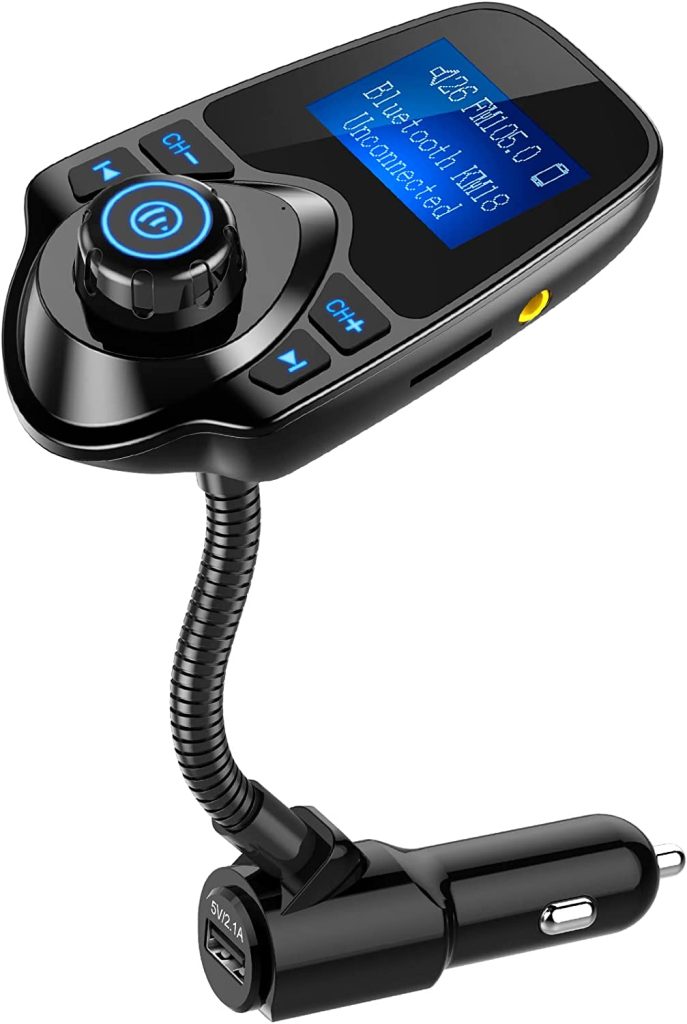
In addition to adding an auxiliary input, another option for playing music from your phone through your car’s audio system is to use an in-car Bluetooth FM transmitter radio adapter. This device plugs into your car’s cigarette lighter or power outlet and connects to your phone via Bluetooth. It then broadcasts the audio signal to your car’s FM radio, allowing you to listen to music, podcasts, or phone calls through your car’s speakers.
To use an in-car Bluetooth FM transmitter radio adapter, you’ll need to follow these steps:
- Choose a compatible adapter: There are many different in-car Bluetooth FM transmitter radio adapters available on the market, so be sure to choose one that is compatible with your phone and your car’s audio system. Some popular options include the Nulaxy Wireless In-Car Bluetooth FM Transmitter, the VicTsing Bluetooth FM Transmitter, and the Roav SmartCharge F0.
- Plug in the adapter: Once you’ve chosen an adapter, plug it into your car’s cigarette lighter or power outlet.
- Connect to your phone: Turn on Bluetooth on your phone and search for the adapter’s Bluetooth signal. Once you’ve connected to the adapter, you’ll be able to play music or take phone calls through your car’s audio system.
- Tune your radio: To hear the audio signal from the adapter, tune your car’s FM radio to the same frequency as the adapter. Most adapters will have a button or dial that allows you to adjust the frequency, so you can find a clear channel to broadcast on.
- Enjoy your music: Once you’ve connected the adapter and tuned your radio, you can start playing music or taking phone calls through your car’s audio system. Adjust the volume and balance settings as needed to ensure optimal sound quality.
In-car Bluetooth FM transmitter radio adapters are a convenient way to add Bluetooth connectivity to your car’s audio system without the need for complex installation or wiring. They are also portable, so you can easily move them between different cars or use them outside of your car, such as at home or at the office.
In conclusion, adding an in-car Bluetooth FM transmitter radio adapter is another option for playing music from your phone through your 2006 Volkswagen Passat’s audio system. It’s easy to use, requires no complex installation, and provides a convenient way to enjoy your favorite music and phone calls while on the road.
In summary, the 2006 Volkswagen Passat may or may not come with an aux input, depending on the specific model and trim level. If your car doesn’t have an aux input, it’s possible to install one by following the steps outlined above. By adding an aux input, you can enjoy your favorite music and podcasts through your car’s audio system, making for a more enjoyable driving experience.
